
The Data Analysis Toolbar in ArborPro's software plays a critical role in turning tree inventory data into insights, allowing you to interpret your data to support planning and decision-making.
Listed below is a breakdown of the tools within the Data Analysis Toolbar and what each one does. While layouts can vary in order, these are the core components and how they function: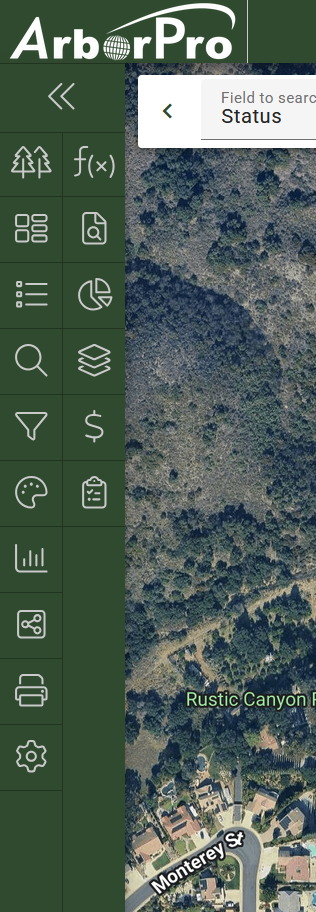
Arborist Tip: Did you know you can click and drag the icons within your Data Analysis Toolbar to customize its layout order?
- Properties: The Properties pane helps organize your data by acting like a folder system and categorizing datasets based on the property location field.

- Groups: View predefined collections of trees or data records based on shared characteristics.

- Work Lists: Worklists are organized task lists that help you plan, assign, and track tree maintenance and management activities.

- Search: Finds tree or data records by key fields (ID, species, location, etc.). This opens a search to create a selection for matching items in the inventory.

- Filter: Control which data points are shown or hidden in your Map View to highlight key insights quickly.

- Color Palette: Performs as a helpful visual aid tool used in creating reports or printing maps to quickly interpret color-coded data.

- Reports: Generate, customize, and export CSV and PDF reports based on your defined datasets.

- Community Viewer: Share a secure public-facing view of your selected data, making it accessible to residents, clients, or stakeholders without giving them full database access.

- Print Map: Create, customize, and export a formatted map view of your tree data for printing or sharing.

- Layer Management: Control which layer data is visible on your map and adjust their settings to how they are displayed on your Map View.

- Data Summary: Provides a quick graphic overview of key statistics and metrics.

- Price Menus: Quickly apply preset pricing when estimating tree work for clients.

- Proposals: Deliver client-ready quotes for tree work and services.

- Formulas: Create a formula using the data in your inventory.

- Preferences: Customize your database settings to match your workflow needs.
